Wednesday, November 03, 2010

Attribute Clash for The GIMP

When I was browsing through The GIMP plug-in registry, I came across a very interesting sounding filter called "zx spectrum filter" by that promised it would imbue your images with all the glorious display limitations of the Sinclair ZX Spectrum.

As it was written in Python I thought I'd give it a go, but the plug-in refused to work. It took about an hour spuddling about to get the plug-in working. The main problem was incorrect indentation - Python is fussy about that. I also added some code to allow undoing and for the plug-in to appear in the Filters menu and then I could start playing!

Before

After

My fixed version of the plug-in can be downloaded from here, and adds the plug-in to Filters -> Artistic -> ZX Spectrum.

GNU/Linux users need to set the Execute permission for the file zxspectrum.py before the The GIMP will recognise it.

The plug-in is a very simple proof of concept and doesn't work particularly well on small (as in ZX Spectrum sized) images as it just averages out the values in character squares, but it certainly creates some interesting effects on large images. 1024 x 768 seems to be the optimum size.

Large images work best

The next step would be to speed it up using the array library and to stop it from falling over nastily if you have an alpha channel on your image - if you do, you'll have to remove it to get the filter to work.

Wednesday, October 27, 2010

Stairways to Starways

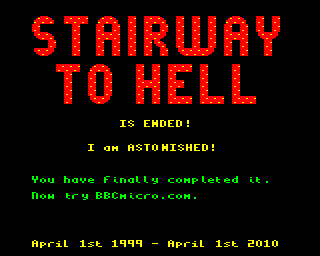
For over ten years now, one of my favourite web-sites has been "The Stairway To Hell".  This web-site has been an invaluable resource to anyone who ever had a BBC Microcomputer or Acorn Electron in their youth. As well as being a fascinating site in its own right, it was also bolstered by a lively and interesting forum.

At the end of March this year Dave Moore, the web-master, decided it was time for a change. His initial plan was to replace the site with a new one - BBCMicro.com - that would be less focused on gaming.

He asked if I could provide an image to close the site down, and thought something similar to the kind of screen you got when you completed one of the Repton games might be nice.

I completed Repton 2 in the GNU/Linux port of the BBC Microcomputer emulator B-Em, screen grabbed the final screen:

Once was enough Tim!

I loaded the BBC Micro version Repton 1 into the screen memory in B-Em so I could cut and paste from the Repton1/2 font:

Repton 1 loaded into the screen memory

Now I used the letters from the Repton 1 screen to edit the Repton 2 screen in The GIMP to say what Dave wanted:

Pristine Screen

However, this didn't really look "retro" enough. The look I was going for was BBC B on badly tuned domestic telly with some interference.

So I ran this image through my own simulated PAL filter which I wrote in Python for The GIMP. Then I used some VHS noise that I extracted from a old recording of ATV Today using Grain Extract and then added it to the image using Grain Merge. I also added a Lens Distortion in The GIMP and desaturated the colours slightly.

Click to enlarge

I was delighted to find out that some people thought the image was actually a real screenshot.

A few months after this picture went up, Dave shelved his plans for BBCMicro.com. His work with the CGEU with organising shows such as R3PLAY and Acorn World meant that he no longer had the time to devote to creating a new site.

However, this wasn't the end, as Peter Edwards stepped in to carry on the good work with a new site called stardot.org.uk. He asked me to amend my image accordingly:

Click to enlarge

Sadly I didn't do such a good job on this image as I was in a hurry - it's a bit dark. But the most important thing is that the on-line Acorn community is thriving and stardot.org.uk looks destined for great things.

Saturday, October 23, 2010

Totally Bazaar

Well, after promising myself I'd get around to doing this long, long ago I've finally put my house (or should that be home?) in order and submitted my Projects folder to the discipline of a version control system.

Nautilus, but nice

I create a huge amount of work on various projects in the course of a year - much of which I blog about here. And I often go back and revisit files numerous times. But to err is human and sometimes I mess things up or find that my new version wasn't the improvement I'd hoped. Therefore I tend to create large numbers of back-ups just in case.

Up until now I've been using an ad hoc system of either backup folders or appending version numbers to the end of file-names. However this is messy, wasteful on disc space and prone to error. That's where a version control system comes in.

Even though version control systems are usually seen as a collaboration tool, they are also a really good idea for personal projects.

I'd actually chosen the version control system I wanted to use a couple of years ago - it's the extremely elegant Bazaar (or BZR), a free software project started by Canonical. The Bazaar project not only encourages personal use of version control - they even provide instructions especially for personal users.

There were three big attractions of Bazaar for me. The first is that it has a single command - bzr. The second is that it puts everything in a single folder /.bzr. I don't need a database or a server or anything like that. And the third is that it takes five minutes to learn. I actually use it from the command line, but there are graphical front ends for it too.

As most of my work these days is either in Python or Inkscape - which are both based on text files - there was no excuse for not using a version control system earlier.

Monday, October 18, 2010

Anchor Revisitation

A little while ago Gareth Randall dropped me a line to let me know he was going to use my Anchor typeface for one of his projects.

Gareth is an award winning promo maker, who I first got to know when was making trails and promotions for ITV.  He was one of the masterminds behind the final London Weekend Television start-up routine.

I was delighted to discover that the project Gareth had in mind was a promotion for the Doctor Who Revisitation Box set. Being a bit of a fan of Terrance Dicks and Robert Holmes this was a huge honour. So, here is Sharaz Jek trying to get Peri to suck his finger. I like to think it was my rather foxy typeface that got him in the mood...

Tight wad won't pay for a colour licence

Thursday, October 07, 2010

Lost In Translation

I've blogged a few times about ClapTraps, the ingenious free software puzzle game written in PyGame and Python by testpilotmonkey. The last time I blogged about it, I mentioned I was planning to add i18n (internationalisation) and a bit of l10n (localisation) to the game.

Claptraps in British English

In terms of internationalisation, what I wanted to do was to make the game multi-lingual so that on my daughters' computer, where they use Hungarian rather than English, they would be able to play the game in Hungarian.

I had been under the mistaken impression that all I needed to do to prepare a Python script for i18n was to import the gettext library and then surround all translatable strings with the function _().

It turned out to be a little bit more complicated than that. The reason was that I wanted ClapTraps to stay self contained in a single folder rather than force the user to install it.

ClapTraps' self-contained folder structure

Normally when GNU/Linux programs are installed on a computer, the compiled translation scripts are copied to a central location for access by all users of the computer. On Fedora GNU/Linux, that location is /usr/share/locale. Python always expects the compiled translation files to be stored there. However, I wanted my translations to remain in the ClapTraps folder.

It would have taken me quite some time to work out what to do if Mark Mruss had not already solved all the problems for me in his excellent blog post on translating Python/PyGTK programs. There's a fantastic snippet of code there called "Translation stuff" that magically does it all!

The next step, now I had the Python script prepared, was to generate a POT (Portable Object Template) file. The POT file is the template file from which individual translations can be prepared.

The POT file for ClapTraps

It contains a header, then a list which shows the line a translatable string appears in, the id of the translatable string, and a space for the translation.

I found one problem when first creating my POT file was that it only had five strings in it! The reason was that testpilotmonkey had used single quotes for most of his strings but xgettext, the tool you use to create a POT file, only recognises double quotes.

From my POT file, I used the msginit tool to create two PO (Portable Object) files - one for en_GB (British English), the other for hu (Hungarian). Now came the really hard part - the Hungarian translation! I did this myself, but it took me three days until I was happy. The main problem was my difficulty with the imperative mood in Hungarian. Fortunately the excellent website HungarianReference.com helped enormously. My Hungarian is still a bit dodgy, but I like to think that adds to the charm.

Finished PO file with Hungarian translation

Now all I needed to do was compile my PO files in MO files and I could see if it worked. To test the game I used the LANG variable from the command language.

To force the game to run in Hungarian whilst running Fedora 13 in British English I typed LANG=hu python claptraps and....

Magyar and testpilotmonkey - a tricky combination!

Success! That was a lovely feeling. Now the next challenge was a bit of l10n. The problem I faced was that ClapTraps regularly asks the user to press Y for Yes or N for No. But in Hungarian that should be I for Igen or N for Nem. So I needed some way of changing the keys that you need to press to suit the current language.

This turned out to be quite easy - first I had to import the locale library. Next, I just needed to ask the locale class for the initial letters used for "yes" and "no" in a language like this:

# Make lists of "yes" and "no" keys for current language
locale.setlocale(locale.LC_ALL, '')
yes_keys=list(locale.nl_langinfo(locale.YESEXPR)[2:-3]);
no_keys=list(locale.nl_langinfo(locale.NOEXPR)[2:-3]);

The nl_langinfo function returns a regular expression string with the acceptable keys for Yes or No for the current locale. For English it would be:

^[yY].*
^[nN].*

For Hungarian it would be:

^[IiyY].*
^[nN].*

Note that Y is also acceptable for Hungarian. I used the Python slice operator to slice off the bits I didn't want and then bunged the result in a variable. So now, when I want the user to press yes or no I simply do this:

while(1):
    wait_event = pygame.event.wait()
    if wait_event.type == pygame.KEYDOWN:
        if pygame.key.name(wait_event.key) in yes_keys:
        return False
    elif pygame.key.name(wait_event.key) in no_keys:
        program_quit = False
        break 
    else:
        pass

And that solves it. Since I made these changes to ClapTraps my daughters have both had hours of fun out of the game. It's a tribute to the genius of testpilotmonkey - and Richard Stallman. For, without the GPL, I wouldn't have been free to make these changes which allowed my children to enjoy this fantastic piece of software.

Wednesday, October 06, 2010

Per ardua, ad astra

Recently I wrote about the flyers I created for the R3PLAY Arcade, Retro and Video Gaming Expo that's going to be held in Blackpool on the 6th and 7th November 2010. Here's Doris Speed holding an example:

Some people are so easily pleased

At the same time as I put flyers together, I also prepared two half page magazine advertisements to appear in retroGAMER and gamesTM magazines.

This was a very exciting job for me, as I've always wanted some of my work to appear in a computer magazine, and retroGAMER was a magazine I used to buy regularly when I lived in the UK.

The fliers were produced as large uncompressed TIFF files. I exported large PNG files from the Inkscape source file and then converted them into TIFFs using The GIMP.

I was delighted this morning when Dave Moore, one of the organisers of R3PLAY, sent me a picture of the adverts appearing in the magazines themselves.

In retroGAMER...

Click to enlarge

 ...and in gamesTM.

Click to enlarge

The R3PLAY Arcade, Retro and Video Gaming Expo is going to be held in Norbreck Castle, Blackpool on the 6th and 7th of November 2010. You can order tickets from www.r3play.info, in-store at WHO, 30-32 Coronation Street, Blackpool or by phone on 01253 291188.

Sunday, October 03, 2010

The Ultimate Seventies Cliché

Well, I had to do this in Inkscape sooner or later, and this morning I had three quarters of an hour spare and I couldn't resist it any longer.

I only ever used to get Spangles in that netting Christmas stocking that Mars used to do. It always had a board game on the back with a hexagonal spinner thing you had to cut out and put a match through to use instead of a dice.

Click to Enlarge

I used to find the Old English Spangles absolutely disgusting as a child - trying to eat a whole packet was probably the closest I'll ever get to a bush-tucker trial - but I'm sure I'd love them now.

PNG to PNG Sequences

When I'm putting videos together, one thing I often find handy is being able to turn a single PNG image into a PNG sequence. That means I can import the resulting sequence straight into Avidemux or VirtualDub and to add filters to it.

#!/bin/bash
#
# Convert png file into a png sequence for video use

for i in {1..150}; do
    j=$(printf "%04d" $i)
    cp "input.png" "pngs"$j".png"
done

The Bash script above does that - it takes a file called input.png, and creates copies of it to make a PNG sequence of 150 frames numbered from png0001.png to png0150.png.

Sunday, September 19, 2010

Changing Times

Well, as we prepare to put the clocks back, I thought I'd show you the clocks going forward. Today's Sunday Matinee is a slice of Granadaland from the 50s, 60s, 70s and 80s...

Wednesday, September 15, 2010

No Sleep Til Closedown

My interest in all things Granada was piqued recently when I came across a copy of "Easy Go" by Nick Glennie-Smith. This was the breezy mid-80s start-up piece that was usually heralded by a very naff block graphic transition and ended up with Colin Weston talking over it cheerily in-vision to let us know how parky it was outside.

It's blue, it's CGI - it's just like Avatar!

I've always wanted to have the Granada block graphic transition available as a Flash file should I ever need it, so when I got some free time recently I decided to recreate it. For source material I had an old RealVideo file of a VHS recording of a Granada closedown which I downloaded from the web many years ago.

The Granada transition is based on a grid of 32 x 24 squares, meaning that each square was 24 pixels in size making up the full 768 x 576 PAL resolution. So the first thing I did in Flash 8 was change the grid from 18 pixels to 24 pixels. I then added guides every four grid squares to help positioning on screen.

Setting the Flash 8 grid

To help me create the animation, I needed to view the video file frame by frame in Avidemux. However Avidemux didn't like my rather antiquated RealVideo source file. Luckily I was able to convert the RealVideo file into an mpeg file using the command line video tool ffmpeg:

ffmpeg -i granada\ close\ 1985.rm -r 25 -target dvd -b 3000kb finalvid.mpg

After that I trimmed the resulting mpeg file in Avidemux so that it only contained the transition.

I didn't bother turning the video file into an FLV to import into Flash - just as well as it turned out. I had enough problems with memory as it was! As I run Macromedia Flash 8 using the WINE compatibility layer for GNU/Linux, Flash 8's performance tends to struggle with files over about a megabyte in size.

My approach was to use a symbol for my pixel, and build up each frame using multiple copies my pixel symbol.

A really stupid way to do it...

Although it worked fine at first it was a big mistake in retrospect as it meant I eventually created a large, unresponsive Flash file. This is because when you use Flash in WINE for large files you have to use Save And Compact... for each save to stop the file growing exponentially in size and eventually corrupting. Worse still, whilst it is saving Flash becomes completely unresponsive.

As I worked on the Granada transition each Save and Compact... took longer and longer and would often throw me out of Flash completely so I had to reload it again. Flash also became increasingly slow and unresponsive while I was working. It got so bad that in the end the majority of time was spent "Saving and Compacting" rather than animating.

By the time I'd finished it had taken me an hour to do one second of animation - absolutely ridiculous! My end result was 2.4MB Flash File that took about six minutes to save after each alteration but output a SWF animation that was about 6K in size.

In order to be useful obviously needed a file I could actually work with sensibly. After breaking apart all the square symbols I got a file that was a more manageable 237K - and that could be saved instantly. However the output .swf file went up in size several times to nearly 23K.

A more sensible approach

I kept my original Flash file so that at a later date I can create a 16:9 aspect ratio version of the Granada transition. But I think I'll wait until the performance of Flash 8 improves in WINE before I tackle that one!

The only other problem I had when creating the transition animation was the RealVideo file I had dropped the odd frame, so I had to create two frames from one at certain points.

Finished Transition in Flash Player

Once I had the Granada transition, I decided it would be a shame not to put it to some kind of use, so I decided to recreate a Granada closedown from the mid-80s. I had a recording of a Granada closedown in another ancient RealVideo file and luckily I only needed two extra items - the Granada computer generated station clock and the Granada computer generated ident caption.

I was lucky enough to have some excellent source material for the Granada station clock - the output of the actual clock generator itself courtesy of Greg Taylor. Having the clock output also allowed me to get the RGB values of the actual colours exported by the electronics used to generate the clock and caption. Looking at off-air recordings of the clock and caption in use, I reckon these were often tweaked a bit in the gallery to make them a more Granada-ish powdery blue.

The clock itself was an interesting job. A couple of years ago I would have drawn and animated the entire thing in Flash 8. However, I did a mix and match for this. I drew the bottom of the clock with the Granada Giro G and namestyle in Inkscape 0.47. Then I exported the result as an EPS, imported the EPS into Flash 8 and then drew and animated the clock face itself.

Clock base created in Inkscape 0.47...

I was quite pleased with this - it meant I could use the best tool for each bit of the job. Inkscape is far more suited to drawing logos and lettering, whereas Flash is far more suited to both drawing and animating things like clock faces.

... and finished off in Flash 8

The clock was a pretty quick job, polished off in under an hour from start to finish.

Inkscaped Granada CGI ident

The Granada electronic caption was another quick job, as I had a large, high quality scan of a genuine caption card from Matthew Gulliver's collection to work from. This caption dated from the same era as the closedown and the proportions of both the logo and lettering were identical.

Once I had all the bits and pieces I stuck them together in Flash 8 and exported the resulting sequence as a PNG sequence. I turned the PNG sequence into an uncompressed AVI file using VirtualDub. Then I imported to AVI file into Avidemux to add audio and export the result as an H.264 video/MP3 audio MP4 file.

I uploaded the finished result to my YouTube channel, and here it is:

Sunday, September 12, 2010

Probably The Ugliest Test Card In The World

When I drew my recreation of the IBA electronic test-card ETP-1 in Macromedia Flash, I only captioned it with the large IBA caption.  As I only needed the card to recreate an HTV start-up sequence, I never bothered adding the two best known captions that appeared on the card - for Channel Four and S4C.

IBA ETP1 recreated in Macromedia Flash 8

This always annoyed me, so whilst I was listening to a podcast this morning I finally decided to finish it off. I used Inkscape to draw the lettering - I'll export it as an EPS file for import into Macromedia Flash at a later date.

Beautiful calligraphic script

If you enlarge the image below, you will see that letter is designed on a 10 x 10 pixel grid, with 2 pixel leading between each letter.

Snap to Grid and Clone Object are your friends

Now all I need to is some KPM tracks by Keith Mansfield and I'm back in the early 80s again.

Tuesday, September 07, 2010

Distractions...

My children have been nagging me to add internationalisation (i18n) to testpilotmonkey's brilliant game ClapTraps.

Well, the road to good intentions - I got distracted and ended up designing a level.

Not bad for a first attempt

It was supposed to be very cerebral and contain Repton style apple and grass puzzles but ended up as something to rival Giant Clam in Repton 1. Now, better get back to adding some Magyar to ClapTraps before my daughters get back from school today or they won't be amused!

Sunday, September 05, 2010

Showing Off

Well, I've had Prof. Steve Furber giving lectures in front of my artwork, now I've got the legendary Sophie Wilson playing with robot arms next to it.

Sophie's choice

The event was the Vintage Computer Fesitval, which was held on the 19-20th June at The National Museum of Computing in Bletchley Park.

Nice banner, shame about the carpet.

The artwork, a long banner, was produced for R3PLAY - an computer exhibition which is going to be held on the 6-7 November in Blackpool. I've spent a lot of time on various bits and pieces for this event this year.

R3PLAY vectorised - click to enlarge

The extremely striking R3PLAY logo was originally designed as a raster image by Darren Doyle - better known as "Greyfox". I just about managed, using Inkscape, to reproduce this image in vector format so it could be blown up to enormous sizes for use on banners and posters.

Outlined - click to enlarge

The hardest part of vectorising the logo was reproducing the faint images of flags that are superimposed on the lettering - I had to trace these by hand and it was a long and quite fiddly job - particularly because the effect of the flags is quite subtle.


Flags of all nations - click to enlarge

I also had a problem getting the Inkscape filters to superimpose "raster" lines on top of the lettering. I ended up having to superimpose filtered stripes on top of each other several times.

 Stripes - just squashed ellipses

The raster lines themselves are squashed ellipses in a layer with the "Screen" blend mode enabled so that they make the layers underneath them lighter.

Five layers of outline with glow filter stacked

The final challenge was getting the red glow around the letters correct. Again, this involved layering several filtered copies of the lettering on top of each other, and it was quite a struggle to get it just right. However, the glows scale unpredictably, which means reworking them every time I resize the logo.

Underneath the logo were vector images I created in Inkscape by tracing photographs I managed to find using Google images. Tracing vector computers is a very straightforward job, and quite a pleasant one provided you have some music to listen to. The only hard part is matching fonts, and even that is easy if you have a Letraset catalogue from the seventies!

Not all the vectors I produced were used. For instance, here is my Acorn Electron:

The thinking man's ZX Spectrum

One trick I used when doing this sort of thing is to make good use of the Inkscape Perspective plug-in to map square on views onto a parallelogram.

The pixel artwork at the bottom of the banner was produced by the world renowned pixel artist Gary Lucken (aka Army of Trolls). 

A Gary Lucken masterpiece...

In order to produce magazine advertisements from this artwork I did have to extend it slightly horizontally in The GIMP - I did it by copying elements form Gary's design - I even manage to incorporate the BBC Computer Literacy Project's owl.

...ruined by me. Sorry.

Once I had created this expanded version of the artwork I set about creating the artwork for the adverts that appeared in retroGAMER* and gamesTM magazine. This was quite nerve wracking - to be honest I haven't been so nervous since I was first did graphics to be broadcast on television.

After much experimentation I decided on the 50s font Microgramma to be the "corporate font" for R3PLAY. I like the font, it looks both retro and modern and it was also the Commodore font from the early 80s.

Finished Flyer - lots of Microgramma

I also produced an A5 version for fliers - Dave Moore is one of the masterminds behind the R3PLAY event, and shamelessly uses the fliers for promoting the show at every opportunity.

So my flier was stuck to Daleks....

Stupid tin boxes...

And brandished by attractive young ladies...

Edward Bernays has nothing on Dave M

Another early job was creating the tickets for the event. Again, another Inkscape job for a huge print run which I always find nerve wracking. I recreated both the Macmillan logo and the National Museum of Computing logo as vector images as I didn't have vector copies.

Tickets, please...

The tickets looked rather striking in the end, but Dave Moore told me had to bin the whole of the first print run of tickets and have them reprinted elsewhere in order to do them justice.

The final graphics for the adverts, fliers and tickets were exported as enormous TIFF files. However for things like the roll-up banners I had to produce PDF files. I found the best way to do this from Inkscape was to Print To PDF, rather than export to PDF from Inkscape. The latter method produces absoltuely terrible results, where as printing to PDF produces results which are flawless.

R3PLAY is organised by the non-profit organisation the Computing and Gaming Events Union (CGEU), and I was also responsible for tarting up their logo. The original was again designed by Darren Doyle. I placed it in a roundel, made the Pac-Man image a vector shape and added some depth to him and finally added some lettering in Inkscape:

CGEU logo tarted up

One of my main jobs for the R3PLAY event was producing its website. In order to "save time" we decided to use Joomla and base the design of the website on an existing Joomla template from a commercial supplier who shall remain nameless.


This was a very frustrating experience as there were numerous bugs and several unfinished bits and pieces in the template we purchased and I ended up having to get rapidly expert in PHP and CSS in order to get the thing working as required. There were also no useful Photoshop templates for the artwork, so I ended up having to recreate all the source files for the graphics in The GIMP from scratch.

Obviously this was all good practice for me but not what you want when you are working against a deadline for a very exacting customer!

One of my favourite jobs on the website was producing the animated Pac-Man gif that is displayed about the advert on the home page.

Snapper is nothing like Pac-Man, honest.

To do this I took several screenshots from version 1 of Acornsoft Snapper in Tom Walker's excellent BBC Micro emulator B-Em, traced the sprites and animated them in Macromedia Flash 8 and then exported the result from Flash as an animated GIF.

I produced a forum Post footer too

R3PLAY looks like being an absolutely fantastic show, and well worth a visit if you can make it. Besides which, by attending you will be helping to raise money for two very worthy causes - Macmillan Cancer Support and The National Museum of Computing.

It has three strands - Consoles, Coin-Op games (including Pin-Ball) and Computers. The latter includes a strong retro contingent of the well known names such as BBC Micros, Electrons, Archimedes as well as the more obscure things such as Commodore 64s, Amigas, STs and ZX Spectrums.